
My product opens the wrong page, an old profile or "page not found"
Updated
Your product always opens the profile it's linked to. When you see something else, it's usually one of these, and most you can fix yourself.
It opens another website instead of your profile
Single link mode is on: it sends visitors straight to the first link on your profile. To turn it off on the website, open your profile, choose Contents in the menu on the left and switch off Single link mode. In the app, open the profile, switch off Single link mode and save.
It says "This card is not active yet"
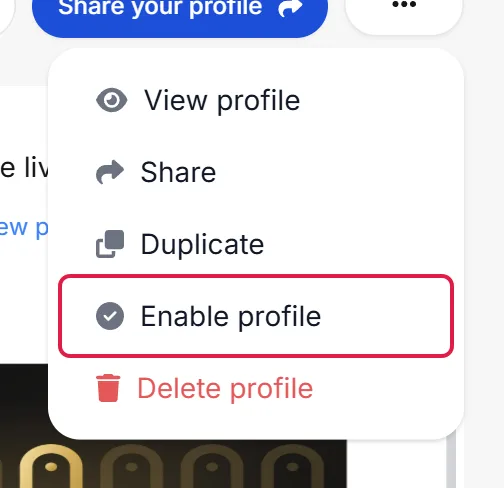
The profile is disabled, so only you can see it while you're signed in. To enable it, sign in at www.mibio.bio on a computer, open the profile, click the ⋯ button at the top right and choose Enable profile.
It shows an old version of your profile
- If you have more than one profile, make sure you changed the one your product opens: tap the product and check whose profile appears.
- Reload the page on the phone you're testing with. Its browser may be showing a copy saved earlier.
It says "Page not found"
The profile the product is linked to no longer exists, for example because it was deleted. Contact us with a photo of the product and the link of the profile it should open, and we'll look into it.
It opens someone else's profile
The product is linked to a different profile. Contact us with a photo of the product and the link of the profile it should open.